December is the busiest month of the year for ads, and the most expensive one to shoot. Studios are booked, models are on holiday and every brand is fighting for the same few seconds of attention.
The good news is that you can make a festive ad in an afternoon with AI video. Below are 20 Christmas and New Year prompts I wrote for product ads, short stories, countdowns and UGC-style videos. Each one is ready to copy, written for Kling 4.0 or Seedance 2.5, and has a clear opening and a complete ending.
Some links in this post are affiliate links. If you sign up through them, I may earn a small commission at no extra cost to you.
What is in this prompt pack
- 8 Christmas product ad prompts for perfume, food, shoes, jewellery, skincare, watches and candles
- 4 Christmas story prompts with dialogue, comedy and family moments
- 5 New Year prompts for countdowns, launches and celebrations
- 3 UGC and sale prompts that look like real people filmed them
- A simple formula to write your own festive prompts, a posting calendar, and mistakes to avoid
How to use these prompts
- Pick a prompt that matches your product or story.
- Open the tool named in the settings line. For product prompts, upload a clear photo of your product with a plain background.
- Paste the prompt, set the length and aspect ratio from the settings line, and generate.
- If the product changes shape or colour, add “keep the product exactly the same as the uploaded photo” at the start and try again.
- Add your logo, captions and offer in any video editor, then post.
New to these tools? Read my guide to the AI tools I use for ads, video and voice to see what each one costs right now.
The holiday prompt formula
Every prompt in this pack follows the same six parts. Once you know them, you can write your own festive prompt for any product in two minutes.
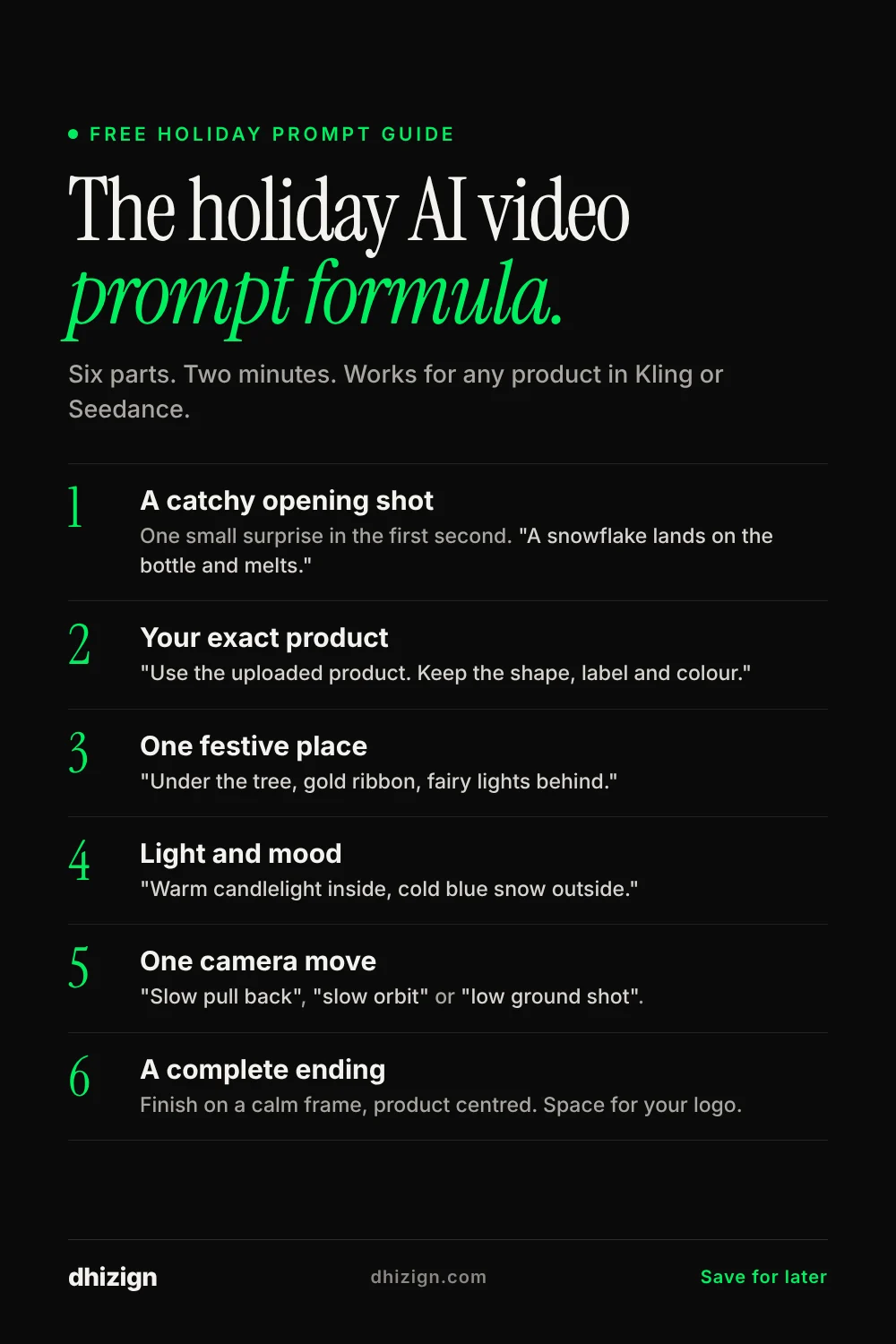
- Opening shot. One small, surprising moment in the first second. A snowflake landing, a cork popping, a match striking.
- Product. Say “use the uploaded product as the exact product” and name what must not change: shape, label, colour.
- Festive setting. One clear place. A frosty window, a rooftop at midnight, a tree with a gift box.
- Light and mood. Warm fairy lights, cold blue snow light, candlelight. Pick one or two.
- Camera. Slow push in, orbit, low ground shot, drone. One or two moves are enough.
- Ending. Always finish on a calm, clear frame with the product centred. That is where your logo or offer goes.
Christmas product ad prompts
Upload your product photo and use these as the base. Each one keeps your product exactly as it is and puts it in a festive scene.
1. Perfume under the tree
Settings: Kling 4.0, 10 seconds, 9:16, 1080p. Upload your perfume photo as the first frame. Where to make it: Kling AI.
Use the uploaded perfume bottle as the exact product. Opening shot: extreme close-up of a single snowflake landing on the glass cap and melting. Slow pull back to reveal the bottle standing in a nest of gold ribbon under a Christmas tree, warm fairy lights blurred behind it. A hand ties the last bow on a gift box beside it. Final shot: the bottle centred, light glowing through the liquid, soft snowfall outside the window. Keep the bottle shape, label and colour exactly the same. Warm, quiet, luxurious. Soft piano and the faint crackle of a fireplace.Why it works: The melting snowflake stops the scroll in the first second, and the ending gives you a clean frame for your logo.
2. Hot chocolate by a frosty window
Settings: Kling 4.0, 8 seconds, 9:16, 1080p. Where to make it: Kling AI.
Opening shot: a marshmallow drops into a mug of hot chocolate in slow motion, a small splash. Camera slowly orbits the mug on a wooden window sill. Outside the window, snow falls on a quiet street with warm lights in the houses. Steam curls up from the mug. A hand with a knitted sleeve picks up the mug and the camera follows it out of frame, leaving the frosty window. Cozy, warm tones, shallow depth of field. Soft sounds of a spoon on ceramic and wind outside.Why it works: Works for any cafe, bakery or drinks brand. Swap the mug for your own cup or packaging.
3. Sneakers in fresh snow
Settings: Kling 4.0, 10 seconds, 9:16, 1080p. Upload the shoe photo as a reference. Where to make it: Kling AI.
Use the uploaded sneaker as the exact product. Opening shot: one sneaker stomps into fresh untouched snow, powder bursts up in slow motion. Low camera at ground level follows the runner through a snowy park at blue hour, street lamps glowing. Close-up of the sole leaving a clean print in the snow. Final shot: the runner stops under a lamp post, breath visible in the cold air, the sneakers sharp and clean in the light. Keep the shoe colour, logo position and sole pattern exactly the same. Energetic, crisp, cinematic.Why it works: Footprints in snow are simple to read in one second, and the logo stays visible on the sole.
4. The ring box surprise
Settings: Kling 4.0, 10 seconds, 9:16, 1080p. Upload your ring or jewellery photo. Where to make it: Kling AI.
Use the uploaded ring as the exact product. Opening shot: a small velvet box sits on a dark table, candlelight flickering, snow falling outside a tall window. A hand slowly opens the lid. The ring catches the candlelight and sparkles. Slow push in to a macro shot of the stone. Final shot: the box open on the table, the ring centred, a small card beside it that reads "Merry Christmas". Rich, warm, intimate. Soft strings and a gentle clink of glass.Why it works: Opening a gift box is a moment everyone knows, so the viewer stays to see what is inside.
5. Bakery window at Christmas
Settings: Kling 4.0, 12 seconds, 9:16, 1080p. Where to make it: Kling AI.
Opening shot: powdered sugar falls like snow onto a tray of fresh star-shaped cookies. Camera rises to show a small bakery window at night, the glass edged with frost, golden light inside. A baker in a red apron places a decorated cake on the window display. Outside, a child presses her hands to the glass and smiles. Final shot from the street: the warm window glowing in the snowy street, a small handwritten sign that reads "Open till midnight". Warm, nostalgic, storybook feel. Soft bells and street sounds.Why it works: Gives small food brands a full story in 12 seconds. Change the sign to your own offer.
6. Winter skincare glow
Settings: Kling 4.0, 8 seconds, 9:16, 1080p. Upload the product photo. Where to make it: Kling AI.
Use the uploaded jar as the exact product. Opening shot: a fingertip scoops a soft swirl of cream, macro shot, rich texture. The jar sits on white marble beside a sprig of pine and a frosted window. Cold blue light outside, warm light inside. A woman with natural freckles smooths the cream on her cheek and smiles softly. Final shot: the jar centred on the marble, a few snowflakes melting on the window behind it. Clean, calm, premium. Soft ambient music.Why it works: Shows texture, use and result in eight seconds, which is what skincare buyers want to see.
7. The New Year watch
Settings: Kling 4.0, 10 seconds, 9:16, 1080p. Upload your watch photo. Where to make it: Kling AI.
Use the uploaded watch as the exact product. Opening shot: extreme close-up of the second hand ticking toward twelve. The watch is on a wrist resting on a rooftop railing at night, a city skyline behind. As the hands meet at midnight, fireworks burst over the city and their light reflects across the watch glass. The wrist lifts a glass in a toast. Final shot: the watch face sharp in the foreground, fireworks soft and colourful behind. Keep the dial, strap and logo exactly the same. Elegant, celebratory.Why it works: Midnight on a watch face is the New Year moment, and it puts the product at the centre of it.
8. Candle and a quiet night
Settings: Kling 4.0, 8 seconds, 9:16, 1080p. Upload your candle photo. Where to make it: Kling AI.
Use the uploaded candle as the exact product. Opening shot: a match strikes in the dark, a bright flare. The flame lights the candle wick and warm light spreads across a small table with a book, reading glasses and a pine branch. Snow falls slowly outside the window. Slow push in on the flame and the melting wax. Final shot: the room glowing softly, the candle centred, the label clear. Calm, warm, silent night feel. Sound of the match, then soft wind.Why it works: The match strike is a strong opening sound and the light change does the storytelling for you.
Christmas story ad prompts
Short stories with a feeling and a full ending. These work best in Seedance 2.5, which handles dialogue and several people well.
9. Grandma on a video call
Settings: Seedance 2.5, 20 seconds, 9:16, 1080p. All dialogue in English. Where to make it: OpenArt or Higgsfield.
All dialogue is in English. A warm family Christmas story. Opening shot: a phone propped against a sugar jar rings with a video call, the screen shows "Grandma". A young woman in a cozy sweater answers in her small city apartment, a tiny tree on the table. Grandma, silver hair and red cardigan, waves from her kitchen far away and says, "Did my parcel arrive?" The young woman opens a box and pulls out a hand-knitted scarf with her name on it. She laughs and says, "You made this?" Grandma smiles and says, "Every Sunday since June." The young woman wraps the scarf around her neck and holds the phone close. Final shot: both of them laughing, the two windows showing snow in both cities. Ending card: "Some gifts take time." Warm, emotional, natural acting.Why it works: Long-distance families are a huge holiday feeling. Delivery, gifting and telecom brands can all use this one.
10. Secret Santa at the office
Settings: Seedance 2.5, 20 seconds, 9:16, 1080p. All dialogue in English. Where to make it: OpenArt or Higgsfield.
All dialogue is in English. A light office comedy. Opening shot: a pile of wrapped gifts on a meeting table, a paper sign reads "Secret Santa". A nervous young designer named Ben watches as his serious manager, Clara, picks up his gift. She opens it slowly. Inside is a mug that says "World's Best Boss (Probably)". The room goes silent. Ben closes his eyes. Clara stares at the mug, then laughs out loud and says, "This is going on my desk." Everyone laughs. Final shot: Clara drinking coffee from the mug at her desk, giving Ben a thumbs up across the office. Bright, funny, warm.Why it works: Comedy gets shared. The mug can be swapped for your own product.
11. The puppy and the gift box
Settings: Seedance 2.5, 15 seconds, 9:16, 1080p. Pixar-style 3D. Where to make it: OpenArt or Higgsfield.
High-end 3D animated family film style, Pixar-inspired. Opening shot: a large gift box under the tree wobbles by itself. A little girl in pajamas freezes on the stairs. The box tips over and a golden retriever puppy tumbles out wearing a red bow, rolls once and sneezes. The girl gasps and runs down the stairs. The puppy runs to her and licks her face. Final shot: the girl on the rug hugging the puppy, the tree lights twinkling, the empty box on its side behind them. Warm, joyful, complete ending. No dialogue.Why it works: Animals and kids are the most shared holiday content. No dialogue means it works in any country.
12. Neighbours and the cookie swap
Settings: Seedance 2.5, 20 seconds, 9:16, 1080p. All dialogue in English. Where to make it: OpenArt or Higgsfield.
All dialogue is in English. A feel-good neighbourhood story. Opening shot: a tray of slightly burnt cookies comes out of an oven, smoke puffs up. A young man named Sam waves the smoke away and sighs. Doorbell rings. He opens the door and his neighbour Maya stands there holding a plate of perfect frosted cookies. She looks at his tray and says, "Trade?" Sam laughs and says, "That is the worst deal you will ever make." She takes one of his burnt cookies, bites it, and says, "Not bad." Final shot: the two of them sitting on the stairs in the hallway, sharing both plates, fairy lights on the railing. Cozy, funny, warm.Why it works: Shows that a small, human moment beats a big production. Perfect for food and home brands.
New Year ad prompts
For New Year sales, launches and countdown posts. Post these between December 26 and January 2.
13. Countdown product reveal
Settings: Kling 4.0, 10 seconds, 9:16, 1080p. Use keyframes for the countdown. Where to make it: Kling AI.
Use the uploaded product as the exact product. Opening shot: a large number 3 made of light flickers in a dark studio. It changes to 2, then 1, in sync with deep bass hits. On zero, a burst of gold confetti explodes and the product rises into the centre of the frame on a slowly turning stand. Gold and green light sweeps across it. Final shot: the product sharp and still, confetti settling around it, text space at the top. Bold, high energy, premium.Why it works: A countdown builds tension that people watch to the end. Use it for New Year launches and sale reveals.
14. Midnight toast on the rooftop
Settings: Kling 4.0, 10 seconds, 16:9, 1080p. Where to make it: Kling AI.
Opening shot: a champagne cork pops in slow motion, foam spilling over the bottle. Wide shot of friends on a rooftop at night wrapped in warm coats, string lights overhead. They raise glasses as fireworks fill the sky over the city. Close-up of four glasses clinking, light from the fireworks reflecting in them. Final shot: the friends silhouetted against the colourful sky, hugging and laughing. Joyful, cinematic, warm and cold light together. Sounds of fireworks and cheering.Why it works: Event, drinks and travel brands can drop their logo on the last frame. Use 16:9 for YouTube and websites.
15. New year, new me (almost)
Settings: Seedance 2.5, 15 seconds, 9:16, 1080p. All dialogue in English. Where to make it: OpenArt or Higgsfield.
All dialogue is in English. A short comedy. Opening shot: January 1st, 6 a.m., an alarm rings. A man named Leo jumps out of bed in brand new gym clothes, full of energy, and says to the mirror, "This is my year." Quick cuts: he ties his shoes, opens the front door, and sees heavy rain. He stares at the rain. Final shot: Leo back on the sofa under a blanket in his gym clothes, eating cereal, saying, "Tomorrow is also my year." Bright, funny, relatable.Why it works: Everyone has broken a resolution. Fitness apps, cereal, coffee and home brands can all use this.
16. The resolution journal
Settings: Kling 4.0, 8 seconds, 9:16, 1080p. Upload your notebook or stationery photo. Where to make it: Kling AI.
Use the uploaded notebook as the exact product. Opening shot: a pen writes "2027" in bold on a fresh page, macro shot, ink shining. Morning sunlight falls across a desk with a coffee cup and a small plant. Pages turn in a soft breeze, showing short handwritten goals. Final shot: the notebook closed on the desk, the cover centred, sunlight on it. Calm, hopeful, clean. Soft acoustic guitar.Why it works: A fresh start feeling, calm and simple. Good for stationery, planners, courses and coaching.
17. City lights at midnight
Settings: Seedance 2.5, 15 seconds, 16:9, 1080p. Where to make it: OpenArt or Higgsfield.
Opening shot: a drone glides over a quiet city river at night, the water reflecting the lights. Hundreds of people gather on a bridge holding small sparklers. The camera rises as the clock tower strikes midnight and fireworks burst over the river all at once. Close-up of a young couple sharing a scarf, laughing as the sparklers light their faces. Final shot: a wide view of the whole bright river, fireworks reflected in the water. Epic, emotional, cinematic. No dialogue, music and crowd cheering.Why it works: A big opening for tourism, hotels and city event pages. No dialogue so it works everywhere.
UGC and sale prompts
Phone-style videos that look like a real person filmed them, plus a sale announcement you can edit.
18. Gift unboxing, UGC style
Settings: Seedance 2.5, 15 seconds, 9:16, 1080p. All dialogue in English. Where to make it: OpenArt or Higgsfield.
All dialogue is in English. Phone-camera UGC style, filmed handheld in a cozy living room with a Christmas tree behind. A young woman sits cross-legged on the floor holding a wrapped gift up to the camera. She says, "My sister always gets me the weirdest gifts, so here we go." She tears the paper and her face lights up. She holds up the product to the camera and says, "She finally got it right." She laughs. Final shot: she holds the product next to her face and smiles at the camera. Natural light, real skin texture, relaxed acting.Why it works: UGC-style ads often perform better than polished ones on social. Replace the product with yours.
19. Holiday sale announcement
Settings: Kling 4.0, 8 seconds, 9:16, 1080p. Where to make it: Kling AI.
Opening shot: a red ribbon on a large gift box is pulled open by an invisible hand. The lid flips off and bright green and gold light pours out. Bold text flies up out of the box and settles in the centre: "Holiday Sale, up to 40% off". Small gift boxes fall around the text and bounce softly. Final shot: the text clear and still, the open box glowing below, space at the bottom for your website. Fun, bright, festive. Short jingle bells.Why it works: Edit the text and colours to match your brand. Short enough for Stories and Shorts.
20. What I got for Christmas
Settings: Seedance 2.5, 15 seconds, 9:16, 1080p. All dialogue in English. Where to make it: OpenArt or Higgsfield.
All dialogue is in English. Handheld selfie-style video in a bright bedroom on Christmas morning. A young man in a holiday sweater talks to the camera. He says, "Three things I got this year, ranked." He holds up a pair of socks and says, "Number three." He holds up a coffee mug and says, "Number two." He picks up a small box, opens it and his eyes go wide. He turns the box to the camera and says, "Number one, and I am not sharing." Final shot: he hugs the box and grins. Natural light, fun, quick.Why it works: A ranking format keeps people watching to the end to see number one, which is your product.
When to post your holiday ads
Timing matters as much as the video. People shop early for gifts and late for parties, so plan your posts in waves.
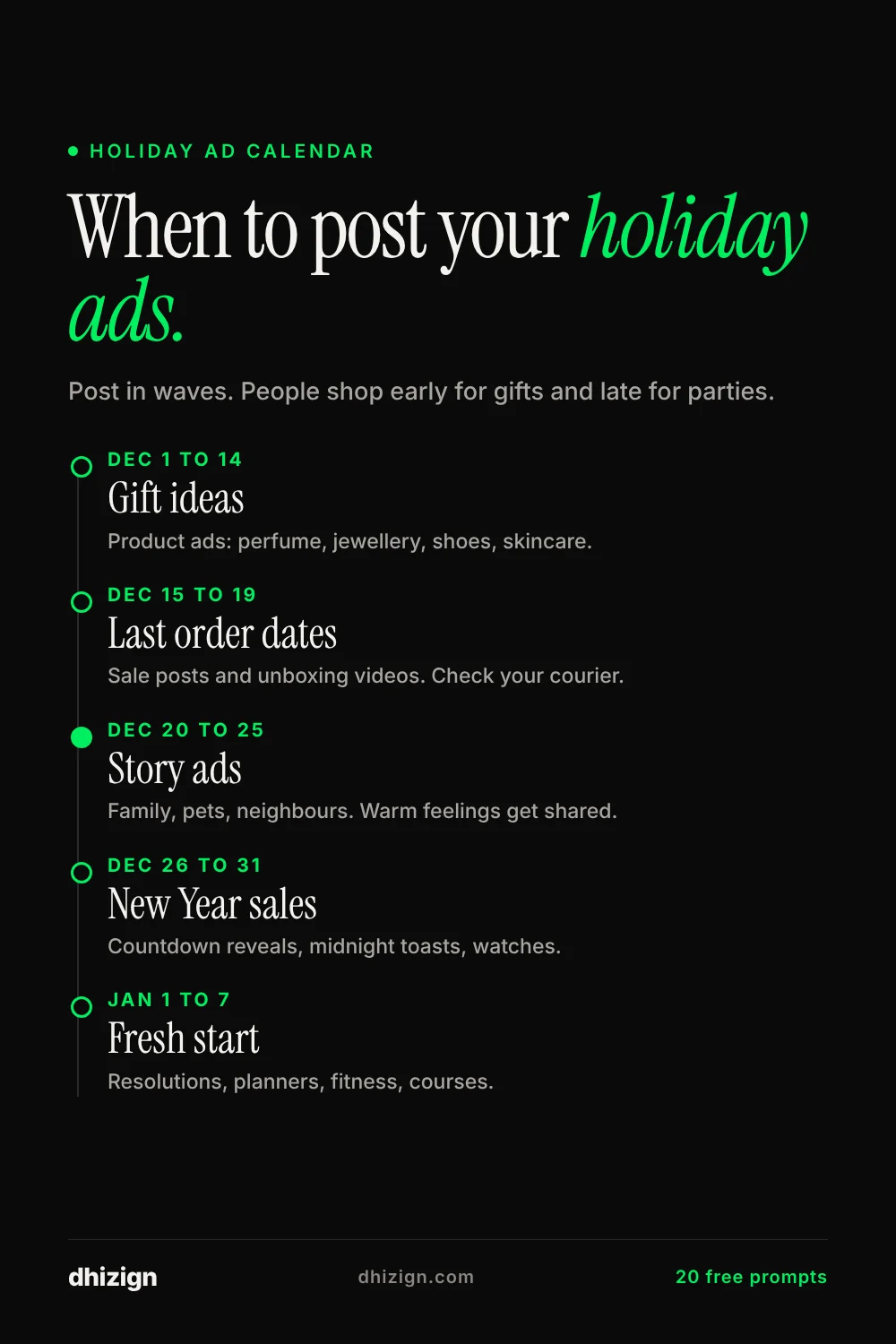
| When | What to post | Best prompts |
|---|---|---|
| Dec 1 to 14 | Gift ideas and product ads | Perfume, ring box, sneakers, skincare |
| Dec 15 to 19 | Last order dates and sale posts | Holiday sale announcement, gift unboxing |
| Dec 20 to 25 | Story ads and warm feelings | Grandma video call, puppy gift, cookie swap |
| Dec 26 to 31 | New Year sales and countdowns | Countdown reveal, New Year watch, rooftop toast |
| Jan 1 to 7 | Fresh start and resolutions | Resolution journal, new year new me |
Why some AI Christmas ads got backlash
In the last two Christmas seasons, a few big brands released fully AI-made holiday ads and got strong reactions. Coca-Cola’s AI ads drew mixed comments, and McDonald’s in the Netherlands pulled its AI Christmas ad in December 2025 after viewers called it cold and strange. The video below covers what happened.
The lesson is not “do not use AI”. It is that people notice when a holiday ad has no real feeling. Here is how to avoid that:
- Tell one small human story instead of showing lots of random festive scenes.
- Keep faces natural. Ask for real skin texture and relaxed acting, and cut any shot where hands or faces look wrong.
- Use fewer, longer shots. Fast cuts of strange scenes feel machine-made.
- Add a real voice or real music where you can.
- Be open about it. A short “made with AI” line in the caption builds trust.
Tips to make festive AI videos look real
- Ask for one light source, like a window or a candle. Mixed lights look fake.
- Snow looks best falling slowly outside a window rather than on people.
- Keep text short. AI still gets long words wrong, so add long text in your editor.
- For the same person across several videos, make a character sheet first. My Across the Hall series shows how.
- Make three versions of each prompt and keep the best one. That is normal, not a mistake.
Common questions
Which tool is best for Christmas product ads?
Kling 4.0 keeps products steady and lets you add keyframes, so it is my first pick for product shots. For stories with dialogue and several people, Seedance 2.5 is stronger. I compare them in detail in Kling 4.0 vs Seedance 2.5 vs Veo 3.1.
Can I use these prompts for free?
Yes. The prompts are free to copy and change. To generate the videos you need credits. Kling gives 66 free credits every day, which is enough to test short clips.
Can I use the videos for my business?
Yes, on a paid plan that allows commercial use. Most free plans do not. Check the plan before you post an ad.
How long should a holiday ad be?
For Reels, Shorts and TikTok, 8 to 15 seconds works best. Story ads can go up to 20 or 30 seconds if the ending pays off.
Make your holiday ad this week
Pick one prompt, swap in your product and generate three versions today. Holiday ads that go out early get the most views before feeds get crowded.
Want more ready-to-use prompts? Browse the free prompts library. Want a festive ad made for your brand? Tell me about your project.